What is AI-powered trial balance and how does it work?
By The AI Ledger editorial team | Published 2026-08-26 | Updated 2026-11-20
An AI-powered trial balance is a system that imports ledger data, groups and foots account balances automatically, then flags anomalies for a human accountant to review before sign-off. It handles the arithmetic and the pattern spotting; you handle the judgement calls.
In practice, the software does three jobs:
- Import and mapping: pulling data from your ledger and matching accounts to standard groupings
- Footing and totalling: adding up balances and checking the trial balance actually balances
- Anomaly detection: flagging unusual variances, missing entries, or figures that break historical patterns
The short version: AI drafts the trial balance, and you remain the reviewer and the signatory. Your professional responsibility does not change; what changes is the time spent keying in figures and chasing arithmetic.
Key Takeaways
AI trial balance tools draft the numbers and flag anomalies, but the accountant's review and sign-off remain the control that stops errors reaching the client.
| Point | Details |
|---|---|
| Definition | AI imports, maps, foots and flags a trial balance; a human accountant still reviews and signs it. |
| Balancing is not correctness | A balanced trial balance can still hide omitted or misposted transactions, so anomaly checks matter. |
| Human review is part of the result | Research finds accountants step in where the AI's confidence is low, and that relying on weak AI recommendations raises the risk of error. |
| Governance comes first | Require an audit trail, materiality thresholds and a decision log before trusting any tool with live client data. |
| Evaluate before adopting | Check testing methodology, connector coverage and configurable materiality settings first. |
Table of Contents
- What is AI-powered trial balance: how the technology actually builds one
- Benefits of AI trial balance: what the evidence actually shows
- Where AI trial balance tools fall short
- Running an AI-assisted trial balance from start to sign-off
- How to evaluate an AI trial balance tool or build one in-house
- Where to research AI trial-balance tools properly
- Security and data privacy considerations for AI trial-balance tools
- Connecting AI trial balance tools to your existing software stack
- What accountants get wrong about AI and trial balances
- Sources
What is AI-powered trial balance: how the technology actually builds one
Understanding a trial balance tool starts with the data pipeline. Most tools offer three ways in: direct connectors to your ledger (Xero, QuickBooks, Sage), CSV or Excel import, or pasting data into a template. Ledger software already produces the trial balance itself from posted transactions, as Xero's guide to trial balances explains; the AI layer works on top of that output.
!Hands managing trial balance data import on devices

Once the data lands, the software attempts to map your chart of accounts to standard groupings. The more useful systems keep a persistent mapping: correct a misclassified account once, and the tool remembers it for every future run on that client. That is one of the clearest differences between a useful tool and a spreadsheet macro.
From there, the workflow typically runs like this:
- Footing and cross-checks confirm debits equal credits and flag any imbalance
- Prior-period variance columns compare this period with the last, showing swings that need explaining
- Anomaly detection applies thresholds, so a small variance in office supplies is ignored while a large swing in accrued revenue gets a severity flag
- Proposed adjustments are drafted by the system but should never post automatically
Some tools sit as an add-on inside your ledger; others are a separate layer that pulls data through an API. Either way, expect to step in at mapping exceptions and at any anomaly the system cannot classify with confidence.
Tip: _Run your first AI trial balance alongside your existing manual process for one full close. You will spot mapping errors and set your materiality thresholds before you rely on the tool alone._
Benefits of AI trial balance: what the evidence actually shows
The best evidence so far comes from a study by Jung Ho Choi and Chloe Xie in the Journal of Accounting Research (2026), which surveyed 277 accountants and analysed transaction-level data from an AI-enabled accounting platform serving 79 small and medium-sized businesses. As Stanford GSB's summary (26 June 2025) reports, accountants using AI completed monthly statements 7.5 days sooner, reporting granularity rose 12%, and AI users spent 8.5% less time on routine back-office processing.
The same research found accountants stepping in selectively when the system's confidence scores were low. In the study's experiment, AI assistance improved classification accuracy on average, but relying on AI recommendations that lacked consensus raised the risk of error. The gain depends on the review sitting underneath it.
Where that shows up in trial balance work:
- Transaction classification becomes faster and more consistent as mappings build up
- Variance detection catches swings a reviewer might skim past in a long spreadsheet
- Month-end close shortens because footing, mapping and first-pass anomaly review take less time
- Time moves to review, with less spent on data entry and more on checking and client conversations
Where AI trial balance tools fall short
No AI system guarantees a correct trial balance, only a balanced one. As Intuit's trial balance explainer notes, a trial balance that balances can still hide omitted transactions or figures posted to the wrong account. AI does not change that; it only changes who, or what, is doing the footing.
The sharper risk sits with generative models asked to do more than extract and tag data. A model asked to write narrative statements or fill gaps can produce confident but wrong figures, so keep generative output to drafting and check every number against the ledger.
> A trial balance is not a statement of correctness. It is a mechanical check. Anomalies still need a human to ask "why" before anyone signs anything.
Governance controls that matter here:
- Audit trail: every mapping change, adjustment and override logged with who and when
- Confidence scores: visible per line, not buried in a summary screen
- Versioning: locked runs you can return to if a figure is questioned later
- Materiality settings: thresholds so review time goes where the risk sits
Running an AI-assisted trial balance from start to sign-off
A reliable workflow has five stages:
- Clean the ledger first. Clear obvious errors and suspense accounts before you import. AI cannot fix a messy source file; it just processes it faster.
- Run the import and check the mappings. Review any account the system flags as newly mapped or low confidence, not just the ones it got obviously wrong.
- Investigate anomalies by severity. Start with the highest-flagged variances and note your findings against each one, including the ones you dismiss as immaterial.
- Accept, override or adjust. Post nothing automatically. Every proposed adjustment needs a recorded human decision.
- Lock the run and archive it. Keep the full audit trail so next period's comparatives, and any later query, have a clean record.
Tip: _Record why you dismissed a flagged anomaly, not just why you acted on one. Reviewers often want the reasoning behind a "no action needed"._
How to evaluate an AI trial balance tool or build one in-house
Judge any tool, bought or built, against five criteria rather than the marketing copy:
- Accuracy testing: ask how accuracy was tested, not just for a vendor-reported percentage
- Connector coverage: confirm it connects directly to your ledger and that figures can be traced back to source
- Confidence transparency: a decision log that shows why a line was flagged, not just that it was
- Configurability: custom lead schedules and adjustable materiality thresholds for different client sizes
- Operational fit: a reviewer-friendly interface, sound security and compliance with your firm's data policies
| Criterion | What good looks like |
|---|---|
| Accuracy testing | Stated methodology, not self-reported figures |
| Audit trail | Full mapping history, confidence scores per line, sign-off record |
| Materiality controls | Configurable thresholds that route only high-risk items to reviewers |
Where to research AI trial-balance tools properly
The AI Ledger is an independent directory of 300+ AI tools for accountants and bookkeepers, each with an editor score, a verdict and a last verified date.
- Browse the month-end close and bank reconciliation categories to shortlist tools built for close work
- Compare tools side by side with the comparison page before committing to a connector or workflow
- Use the finder to match your practice size and existing software to relevant options
- Read individual listings for close and review tools such as Silverfin, Inflo, MindBridge and Numeric
- Sign up to the free Friday newsletter for plain-English updates on feature and pricing changes
Security and data privacy considerations for AI trial-balance tools
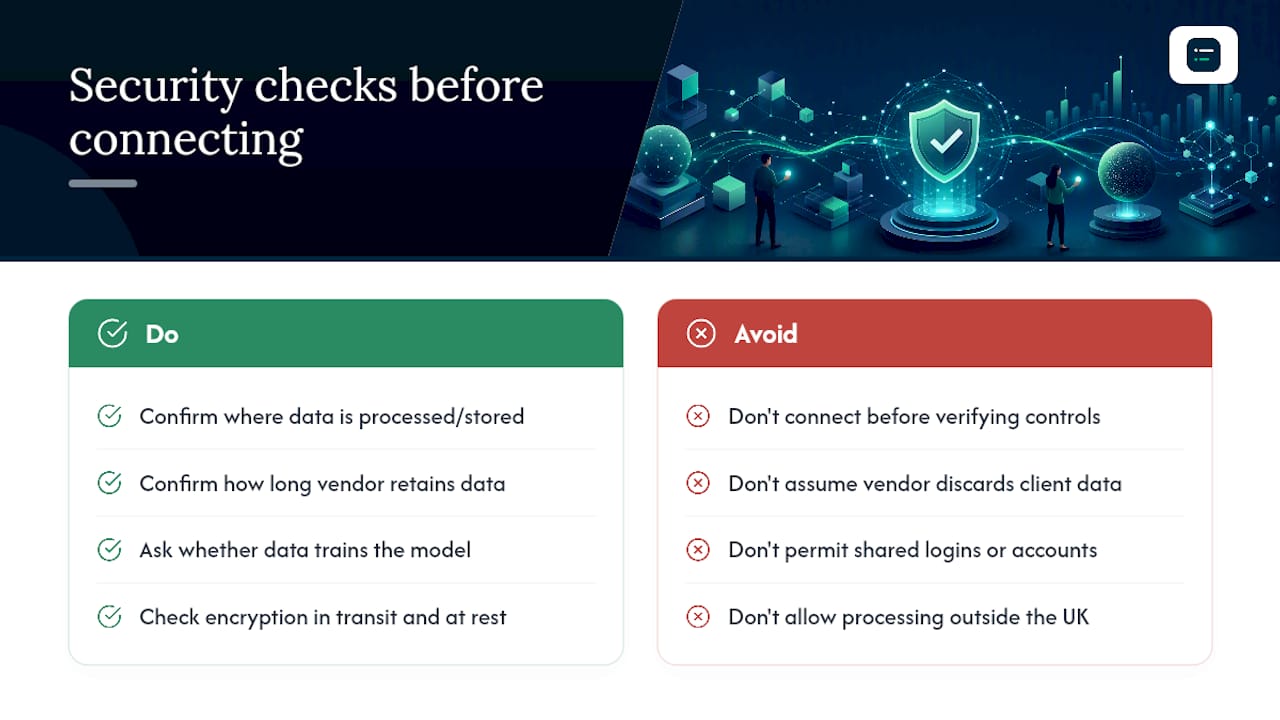
Ledger data is about as sensitive as accounting data gets: client identities, revenue figures and payroll amounts in one export. Before connecting any AI tool to a live ledger, confirm where the data is processed and stored, and how long the vendor keeps it after a run.
Ask directly whether your data trains the vendor's model. Some tools use client data only for the session; others use it for training unless you opt out. That matters for client confidentiality agreements, particularly for regulated clients who expect strict data separation.
Check for encryption in transit and at rest, and whether staff logins are individually tracked or shared under one account. A shared login undermines the audit trail from the start.
Ask about data residency too. If a vendor processes data outside the UK, you need to know before you connect a client ledger. Have a written policy on which tools may touch live client data and who signs off on adding a new connector.
!Security and data privacy considerations for AI trial-balance tools, overview diagram
Connecting AI trial balance tools to your existing software stack
Most AI trial balance tools sit on top of your existing ledger rather than replace it, so the question is whether the tool connects cleanly to the software you already run.
Direct API connectors to Xero, QuickBooks, Sage or FreeAgent tend to be the most reliable route, since they remove the manual export step where errors creep in. CSV and Excel import remain the fallback for less common ledgers or bespoke ERP setups without a connector.
The friction usually shows up in the chart of accounts. A tool built around a generic account structure needs your custom groupings mapped at first, which is where a persistent mapping pays off: once mapped, later periods import faster.
If your practice runs a larger ERP alongside client ledgers, check whether the tool works at both levels or only one. A tool that handles Xero well but cannot touch your internal ERP data leaves you running two review processes.
What accountants get wrong about AI and trial balances
Pitches for AI trial balance tools tend to oversell the automation and undersell the governance underneath. Vendors talk about "hands-off" close cycles; the research does not support that. In the Choi and Xie study, accountants stepped in where the AI's confidence was low, and leaning on weak recommendations raised the risk of error.
The audit trail is easy to undervalue. A confidence score with no decision log attached is a number nobody can defend later. Firms that treat AI output as draft working papers, checked like a junior's first attempt, get the benefit without the exposure.
If you are starting from scratch, set up the account mapping and the materiality thresholds before worrying about which connector looks best in a demo. Those two settings decide whether reviewers spend their time on real risk or on noise.
Sources
- Human + AI in Accounting: Early Evidence from the Field, Jung Ho Choi and Chloe L. Xie, Journal of Accounting Research 64(3), 2026
- Stanford GSB: AI is reshaping accounting jobs by doing the boring stuff, 26 June 2025
- Trial balance: definition, purpose, and example, Intuit QuickBooks
- What is a trial balance?, Xero UK guide
Recommended
- Trial balance in QuickBooks: a guide for accountants
- How accurate is AI at reviewing financial statements?
- AI tools for the financial close process: 2026 guide)
- Balance sheet reconciliation