Trial balance in QuickBooks: a guide for accountants
By The AI Ledger editorial team | Published 2026-08-17 | Updated 2026-11-20
A trial balance lists the closing balance of every ledger account at one point in time, and it exists to prove that total debits equal total credits before you trust anything built on it, including the balance sheet and profit and loss (Intuit's trial balance explainer). QuickBooks produces one in both Online and Desktop; the path depends on which you use.
In QuickBooks Online: go to Reports, search for "Trial Balance", set your date range and accounting basis, then run the report.
In QuickBooks Desktop: go to Reports > Accountant & Taxes > Trial Balance, set custom dates and the report basis, then refresh.
Tip: _If the report looks wrong, check the report basis and date range first. A "broken" trial balance is often just the wrong period or basis._
Once it is open, you should see a simple layout:
- Every active ledger account, from bank accounts down to equity
- A debit column and a credit column for the period selected
- A totals row at the bottom, where debits should equal credits
If the two totals do not match, something in the ledger is wrong. If they do match, you can move on to the balance sheet and profit and loss, bearing in mind that a balanced report can still hide some errors (see below).
Key Takeaways
A trial balance proves total debits equal total credits across every ledger account. QuickBooks produces one in both Online and Desktop, but neither shows opening, debit, credit and ending balances together without an Excel workaround.
| Point | Details |
|---|---|
| Run before, not after | Pull a trial balance before month end close and before handing statements to a client, not just when numbers look wrong. |
| Check basics before repairing | Confirm date range, report basis and filters before running Desktop's repair tools. |
| Combine reports for full detail | Export to Excel and cross-reference Balance Sheet Detail and reconciliation reports for opening, debit, credit and ending columns. |
| Balance is not accuracy | A balanced trial balance can still hide transactions posted to the wrong account or missed entirely. |
| Automate the repeat exports | Use the AI Ledger directory and finder to look for tools that handle recurring exports and reconciliation matching. |
Table of Contents
- Understanding trial balance basics: definition and the three rules
- Trial balance vs balance sheet and profit and loss
- How to run a trial balance in QuickBooks Online
- How to run a trial balance in QuickBooks Desktop
- How to show opening balances, debits, credits and ending balances together
- Fixing trial balance errors in QuickBooks
- Example trial balance layout and how the totals work
- When to run trial balances and best practices worth adopting
- What automation actually changes about trial balance checks
- Find the right automation tool for your practice
- Sources
Understanding trial balance basics: definition and the three rules
A trial balance is a bookkeeping worksheet that pulls the closing balance of every account in the general ledger onto one page, with debits in one column and credits in another. It checks the arithmetic of double-entry bookkeeping; it is not meant to present performance to a bank manager or investor. QuickBooks builds it from every transaction you have posted, which is why it is such a quick diagnostic.
Three rules govern how a trial balance behaves:
- Debits must equal credits. Every transaction in QuickBooks touches at least two accounts, and total debits must match total credits across the whole ledger.
- Each account type has a normal balance. Assets and expenses normally sit as debits; liabilities, equity and income normally sit as credits. An asset account showing a large credit balance is usually a warning sign.
- A balanced trial balance is not necessarily a correct one. Intuit notes it will not catch a transaction left out of the books or one posted to the wrong account, because the debits and credits still balance.
> A trial balance that balances perfectly can still hide a transaction posted to the wrong account. Treating balance and accuracy as the same thing is a common mistake for new bookkeepers.
There are three versions of the report. The unadjusted trial balance reflects raw ledger totals before period-end adjustments. The adjusted trial balance comes after you have posted depreciation, accruals, prepayments and other adjusting entries, and is the one to check before preparing statements. The post-closing trial balance runs after year-end closing entries have cleared income and expense accounts, leaving only balance sheet accounts as the opening position for the next period. In QuickBooks Online, Intuit's community team says the Adjusted Trial Balance report is available in QuickBooks Online Accountant.
Trial balance vs balance sheet and profit and loss
The trial balance is an internal check. The balance sheet and profit and loss are finished statements for people outside the bookkeeping, including lenders, HMRC and business owners.
Think of the trial balance as the working draft that proves the numbers add up, and the balance sheet or profit and loss as the document built from it. The trial balance lists every account, assets and liabilities alongside income and expenses, in one flat list. The balance sheet arranges assets, liabilities and equity into a statement of financial position at a point in time. The profit and loss isolates income and expenses over a period to show whether the business made money.
- Run a trial balance before month end close, before handing accounts to a client, or when a number looks wrong and you need to find which account is off.
- Run a balance sheet when you need to show financial position to a lender, investor or the owner.
- Run a profit and loss when the question is about performance over a period, such as whether margins improved quarter on quarter.
A practical example: if a client's balance sheet suddenly shows negative cash, pull the trial balance first. It shows each account's balance in one list without the statement formatting.
How to run a trial balance in QuickBooks Online
- Open Reports from the left navigation menu.
- Type "Trial Balance" in the report search bar, or look in the "For my accountant" section.
- Set your date range, either a standard period or a custom range.
- Choose the report basis, Accrual or Cash.
- Select Run report.
The customise panel holds the settings accountants use most:
- Date range, plus comparison periods if you want to spot swings against last month or last year
- Report basis, switching between cash and accrual to see how timing differences affect the numbers (covered in The AI Ledger's guide to automated accrual accounting))
- Columns, either a single total or split by month, useful when you are tracking drift across a quarter
One limitation to know: Intuit's community team has confirmed that the Online trial balance cannot be filtered by class. For class-level figures, run the General Ledger or Transaction Detail by Account report, add the Class column and filter on it.
The Online report lists every balance sheet and profit and loss account in one view, which is handy for a quick overview. It shows closing balances only, so you cannot see opening balance, period debits, period credits and ending balance together. The workaround, exporting to Excel and cross-referencing the Balance Sheet Detail report, is in the next section.
After running the report, check it quickly: the totals row shows equal debits and credits, the date range is what you intended, and two or three accounts agree with their registers.
!Hands checking printed trial balance report

Tip: _If a client asks for opening and closing balances side by side, do not hunt for a hidden setting. Export to Excel and build the columns yourself._
How to run a trial balance in QuickBooks Desktop
- Go to Reports in the top menu bar.
- Select Accountant & Taxes.
- Select Trial Balance.
- Choose Custom for the date range and enter the dates you need.
- Choose Accrual or Cash as the report basis, then select Refresh.
Desktop lets you show columns by month rather than a single total, which helps you spot the month an account drifted. The Customise Report window also has filters if you only want to see certain accounts.
If a report looks wrong and you are not sure whether the problem is the company file or the software, open QuickBooks' sample company file and run the same report. If the sample file produces a clean, balanced report, the problem sits in your client's data.
Before handing a Desktop trial balance to a client or using it for statement prep:
- Toggle between Accrual and Cash and check the totals move as you would expect
- Select Refresh after any date change so the report reflects the new dates
- Check the totals against last month's closing figures for continuity
Tip: _Save your preferred columns and filters with Desktop's memorise report option so you never rebuild the same setup twice._
How to show opening balances, debits, credits and ending balances together
This is the most requested trial balance feature among QuickBooks users, and in QuickBooks Online Intuit's community replies confirm the trial balance shows closing balances only. Neither version produces one report with all four columns side by side for a custom period, so you need a short workaround.
- Run the Trial Balance for the prior period end date to capture your opening balances.
- Run a second Trial Balance, or a Balance Sheet Detail report, for the current period to capture debit and credit movement.
- Export both to Excel using the export button in the report toolbar.
- In Excel, build four columns: opening balance, period debits, period credits and calculated ending balance.
- Use a simple formula (opening balance plus debits minus credits, for a debit-balance account) and check it against the closing figure from your second export.
Two other QuickBooks reports help you check these numbers. The Balance Sheet Detail report shows every transaction that hit a balance sheet account in the period, which is what you need to verify the debit and credit movement. The reconciliation report shows cleared and uncleared transactions for bank and credit card accounts, so you can confirm the trial balance figure matches what has been reconciled against a statement.
- Check the opening balance in your sheet matches the prior period's closing figure exactly
- Check total debits minus total credits for the period equals the net movement in Balance Sheet Detail
- Check at least one bank account against its reconciliation report
Tip: _Build the Excel workbook once as a template with the formulas in place, then reuse it every month. The AI Ledger's piece on repeatable workflow templates) covers standardising this across clients._
Fixing trial balance errors in QuickBooks
Most trial balance problems fall into three groups: totals that genuinely do not balance, totals that seem to carry figures from earlier years, or a report that does not respond when you change the date range. Work through them in order.
- Check the basics first. Confirm the date range, the report basis and that no filter is hiding accounts you need.
- Refresh the report after changing any setting.
- Test with the sample company file (Desktop). If the sample file also misbehaves, the issue is likely the software rather than the data.
- Run Quick Fix my Program (Desktop). Close QuickBooks, open the QuickBooks Tool Hub, choose Program Problems, then Quick Fix my Program.
- Verify, then rebuild, the company file (Desktop). Go to File > Utilities > Verify Data. If QuickBooks reports a problem, choose Rebuild Now. Intuit's guide to resolving data issues sets out these steps. Back up first.
- Contact QuickBooks support if the problem continues after a rebuild.
Common data causes to look for directly include duplicated transactions, transactions sitting in a suspense or uncategorised account, and manual journal entries with a missing or wrong offsetting line. Running the audit log (Online) or audit trail report (Desktop) alongside the trial balance often shows which transaction caused the difference.
Tip: _Before contacting QuickBooks support, note the exact date range, report basis and any error messages. It saves going over what you have already ruled out._
Example trial balance layout and how the totals work
Here is an illustration with made-up figures for a small company at a month end. Real ledgers hold many more accounts, but the mechanics are the same.
| Account | Debit (£) | Credit (£) |
|---|---|---|
| Bank | 12,500 | |
| Trade debtors | 4,200 | |
| Equipment | 8,000 | |
| Trade creditors | 3,100 | |
| VAT liability | 1,600 | |
| Share capital | 1,000 | |
| Retained earnings | 8,300 | |
| Sales | 25,000 | |
| Wages | 9,800 | |
| Rent | 3,000 | |
| Other expenses | 1,500 | |
| Total | 39,000 | 39,000 |
- Each account shows its balance on its normal side: assets and expenses as debits, liabilities, equity and income as credits.
- What matters is that the column totals agree across the whole report, not within any one account.
- A small difference usually points to a single miskeyed transaction, and checking recently entered transactions is often the quickest way to find it.
When you compare an exported Excel workbook with this kind of layout, check that your calculated ending balance matches the balance QuickBooks reports. If it does not, the error is in your formula, not in QuickBooks.
When to run trial balances and best practices worth adopting
Running a trial balance only when something looks wrong means you find errors weeks after they happened, when the cause is harder to trace.
Run one at month end close, before preparing any statement for a client or lender, and at year end before closing entries post. A check before statements go out catches errors before the client sees them.
A few habits prevent most trial balance headaches:
- Reconcile bank and credit card accounts before pulling the trial balance, since unreconciled transactions are a frequent cause of surprises
- Check every manual journal entry for its offsetting line when you post it
- Restrict who can post journal entries directly to trained staff
- Report by class using the General Ledger or Transaction Detail by Account report for departmentalised clients, since the Online trial balance cannot filter by class; for separate companies see The AI Ledger's guide to multi-entity automation tools
Tip: _If you run the same export and Excel routine for several clients every month, that repetition is the part worth automating or at least templating._
What automation actually changes about trial balance checks
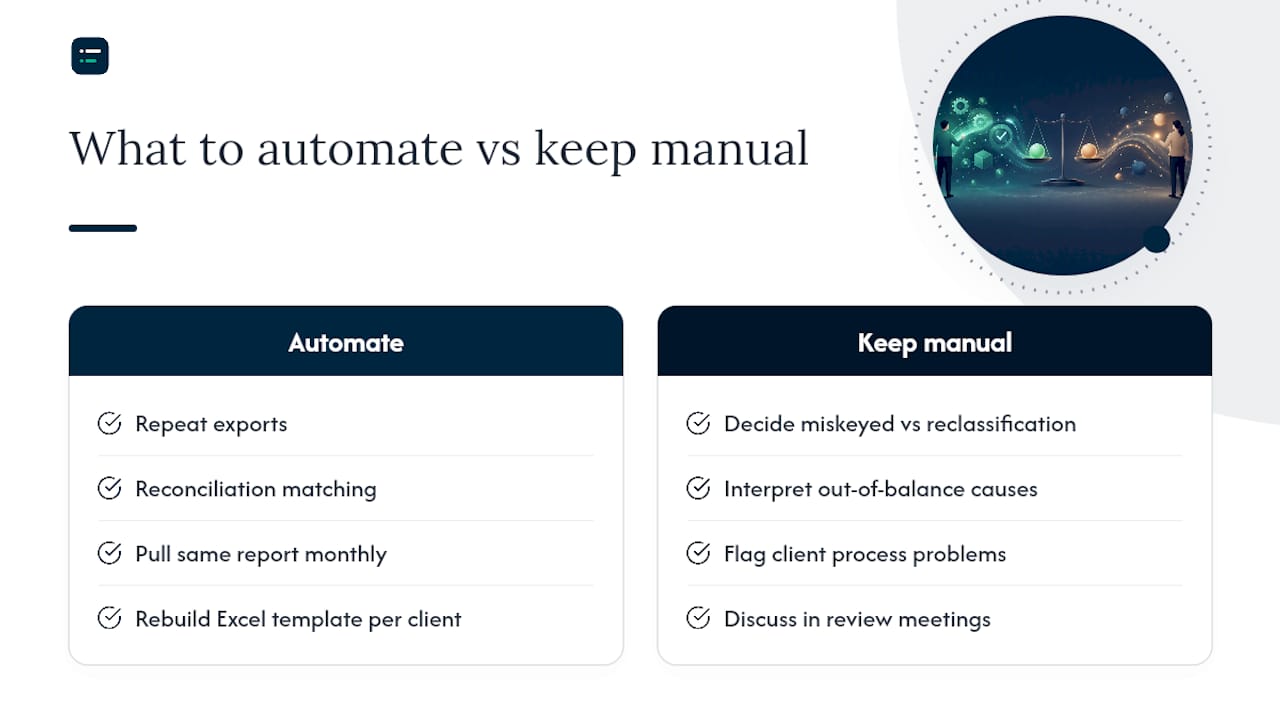
The manual side of trial balance work, exporting, copying figures between reports and rebuilding the same Excel template for each client, is where most of the time goes. None of it needs judgement; it needs consistency.
Automation helps most with repeat exports and reconciliation matching, such as pulling the same Balance Sheet Detail report every month and matching it to a reconciliation file (The AI Ledger's overview of AI in bookkeeping) goes further). It helps far less with the judgement calls: whether a miskeyed transaction was an error or a deliberate reclassification, or whether a difference points to a client process problem worth raising.
A workable dividing line: if a task is the same shape every month and only the numbers change, automate it. If it needs you to ask "does this look right for this client?", keep it manual for now.
Tip: _Try automation on your simplest client first. If it handles a straightforward set of books cleanly for a few months, try it on something more complex._
!What automation actually changes about trial balance checks, overview diagram
Find the right automation tool for your practice
If you use QuickBooks Online, start with what is already built in: our QuickBooks and Intuit Intelligence listing covers Intuit's own AI features. For tools that sit alongside your ledger, browse the month-end close and bank reconciliation categories.

Things automation can help with once your trial balance routine is settled:
- Running recurring exports so you are not pulling the same report by hand every month
- Mapping accounts consistently across clients so reconciliation differences show up sooner
- Flagging out-of-balance figures before a client notices
The AI Ledger's directory of AI accounting tools covers 300+ tools with independent editor scores and a last verified date on every listing, and no score is ever for sale. The finder matches your practice's tasks, such as export automation, reconciliation matching or month end close, to tools built for them, and the free Friday newsletter covers new features and price changes in plain English.
Sources
- Trial balance: definition, purpose, and example, Intuit QuickBooks (checked 20 November 2026)
- How do I create a trial balance report filtered by class?, QuickBooks Team replies, 31 January and 17 May 2024
- Resolve potential data issues in QuickBooks Desktop, Intuit help article (checked 20 November 2026)
This article is general information, not a substitute for advice from a qualified financial advisor. Consult a qualified financial professional about your own circumstances before acting on anything here.
Recommended
- Automation tools for multi-entity accounting: 2026 UK guide
- What is real-time bookkeeping? A guide for small businesses)
- The role of AI in bookkeeping: a 2026 guide)
- Accounting software evaluation checklist: a 2026 guide)