Accounting workflow automation examples for 2026
By The AI Ledger editorial team | Published 2026-07-15 | Updated 2026-11-20
Accounting workflow automation is the use of software rules, triggers and AI to route tasks, enforce approvals and process financial data without someone handling each step by hand. The examples that recover the most time in practice are client onboarding, bank reconciliation, month-end close, receipt and invoice processing, and management reporting. This guide walks through each one, then covers the three types of finance automation workflow, the types of accounting automation software, how to build workflow templates, and the bottlenecks that stop automation working.
For the money side, see our separate guides to accounting automation ROI and finance automation metrics to track.
Contents
- Client onboarding
- Bank reconciliation
- Month-end close
- Receipts and bookkeeping agents
- Invoice processing from capture to payment
- Management reporting
- What are the types of finance automation workflows?
- What are the types of accounting automation software?
- How to build accounting workflow templates
- Common accounting workflow bottlenecks and how to fix them
- How to decide what to automate first
- Controls to set before go-live
- Frequently asked questions
- Sources
Client onboarding
Onboarding is where most practices still rely on email chains and re-keying. A typical automated pipeline links an intake form, e-signature, billing, document filing and the tax or accounts software.
!Accountant reviewing client onboarding at desk

How it runs:
- A new client submits an intake form, which creates the client record in your practice management and billing systems.
- The engagement letter goes out for e-signature automatically, with clauses chosen by service type.
- Uploaded documents are classified and filed to the right client folder.
- Client details pass to the tax or accounts software through an integration rather than being typed in again.
- When every step is complete, the assigned accountant gets a task to review the file.
Before building any of this, write your current onboarding steps on paper. Every point where someone makes a decision is a candidate for a conditional rule. Practice management tools such as Karbon, Financial Cents and Senta handle this kind of templated client workflow; see the client communications category for others.
Bank reconciliation
Reconciliation is the most repetitive daily job for most bookkeepers. Bank rules in the ledger handle the predictable transactions, and AI matching tools now learn supplier patterns so that only genuine exceptions reach a person.
A typical automated reconciliation workflow:
- Bank feeds and ledger transactions import automatically.
- Transactions are matched by supplier name, amount and date pattern, including fuzzy matches where amounts or dates differ slightly.
- Unmatched or ambiguous items go to an exception queue for review.
- High-value items route for approval above a set threshold.
- Every match and every manual decision is logged as an audit trail.
Expect a settling-in period. AI matching improves as it learns each client's suppliers from your corrections, so review its suggestions closely for the first few cycles before you trust it with less oversight. Compare tools in the bank reconciliation category.
Month-end close
Automation turns the close from a final-week scramble into a sequence that runs through the month. In one published case study, a client that had acquired more than 80 entities saved 6,000 hours (three full-time roles) a year by automating report pulling, data analysis and journal entry generation, with new workflows saving roughly three to seven hours per branch each month. The saving came from standardising the process first and then scripting each recurring step.
The components of an automated close:
- Recurring checklists that trigger on a set day each month.
- Dependency routing, so task B only opens once task A is signed off.
- Status tracking that the whole team and the partners can see.
- Approval gates that need evidence attached before a task can be marked complete.
- Journal templates that pre-fill from the prior period and flag variances.
Each approval, upload and variance flag is recorded as it happens, which supports internal review and external audit without extra preparation. Start with one task, such as the bank reconciliation sign-off, and automate that before building the full close. Xenett reviews client books on Xero and QuickBooks Online, while FloQast and Numeric suit in-house close teams. Our guide to AI tools for the financial close process) goes further, and the month-end close category lists every option.
Receipts and bookkeeping agents
Bookkeeping breaks down into small jobs: reading a PDF, applying a tax code, creating the transaction and filing the original. Splitting those jobs among separate AI agents for extraction, categorisation and filing makes the system easier to fix: when one step fails, you repair that step without rebuilding the whole pipeline.
A trigger-based example: an email arrives with a receipt attached. An extraction step reads the document, a categorisation step applies the nominal code, a posting step creates the transaction in the ledger, and a filing step archives the original. Build the categorisation rules around your existing chart of accounts; the more specific the rules, the fewer items land in the review queue.
Capture tools such as Dext and AutoEntry cover the front of this flow. Our guide to the role of AI in bookkeeping) covers the wider picture, and the data entry and receipts category lists the alternatives.
Invoice processing from capture to payment
Accounts payable is the standard finance automation case because volume is high and the steps repeat. The main lesson from practitioners is to connect every stage, so data is entered once and flows through to payment. Teams that automate capture and matching but still re-key approved invoices into the ledger lose most of the benefit and add a new point of error.
!Diagram of accounts payable automation stages
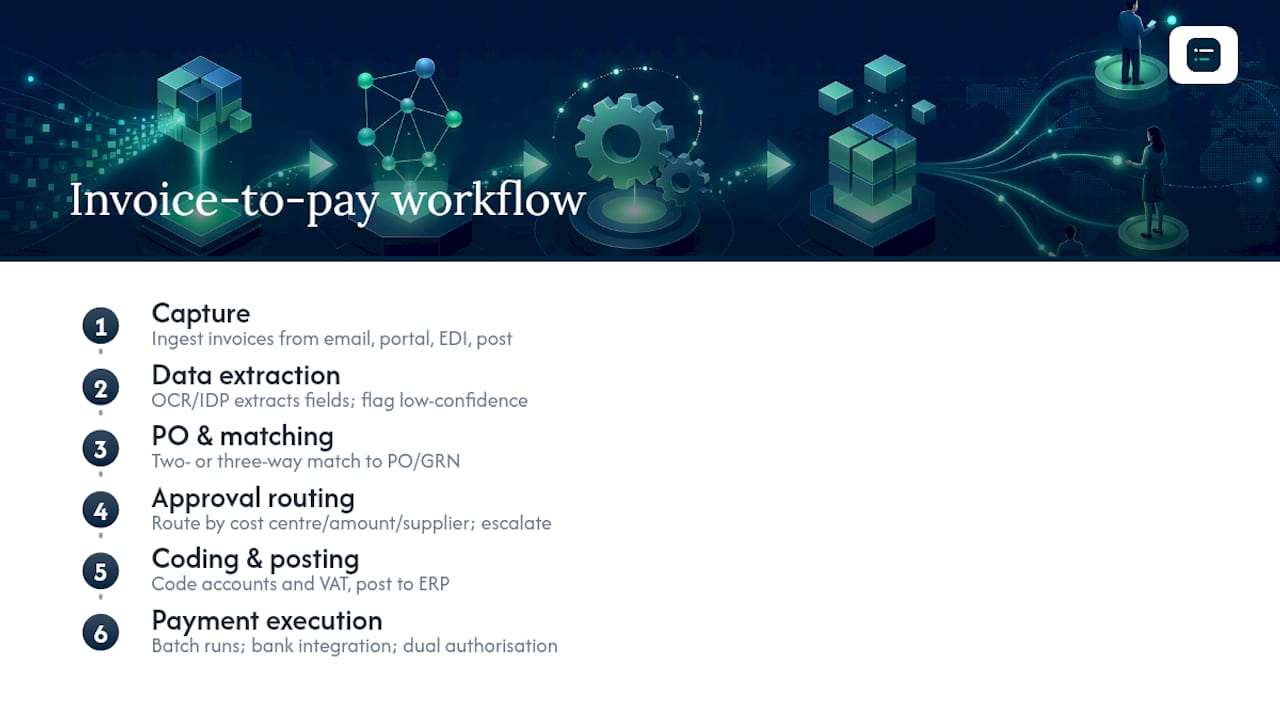
The invoice-to-pay sequence has seven stages:
- Capture. Invoices arrive by email, supplier portal, EDI or post. An automated inbox ingests them; paper is scanned.
- Extraction. OCR and AI extraction output supplier name, invoice number, date, currency, line items, VAT number and totals. Low-confidence fields are flagged for review before they move on.
- Matching. The invoice is matched to the purchase order and, for goods, the goods received note (a three-way match). Service invoices usually use a two-way match against the PO.
- Approval routing. Matched invoices go to the right approver by cost centre, amount band or supplier category, with escalation if nobody acts in time. ApprovalMax adds multi-level approval for bills and payments in Xero and QuickBooks.
- Coding and posting. Approved invoices are coded to nominal account, cost centre and VAT treatment, then posted to the ledger automatically.
- Payment. Posted invoices are batched for payment by bank integration or a payment platform. Keep dual authorisation here whatever the level of automation.
- Reconciliation and archiving. Payment confirmations are matched back to the invoice, and the invoice, PO, GRN, approval record and payment confirmation are archived together. HMRC requires you to keep VAT records for at least six years.
Common AP exceptions and how to handle them
| Exception | Likely cause | Handling |
|---|---|---|
| Missing or invalid VAT number | Supplier error or supplier not VAT registered | Route to AP for a supplier query; hold payment |
| Invoice total mismatch | Price change, quantity difference or rounding | Route to the buyer; do not auto-approve |
| No matching PO | Invoice received without an order | Route to the budget holder for a retrospective PO or rejection |
| Duplicate invoice | Same invoice submitted twice | Reject automatically and notify the supplier |
| Missing GRN | Goods not yet receipted | Hold the invoice; ask procurement to confirm receipt |
Give every held invoice an owner, a due date and an escalation path. An unmanaged exception queue is where AP projects quietly fail.
Management reporting
Automated reporting pulls data from the ledger, applies set templates and produces management accounts, variance reports and board packs on a schedule. Every report uses the same data source, logic and layout, which removes the version-control problems of spreadsheet reporting. When the system flags a variance, the accountant spends their time on the cause rather than on finding it.
Tools such as Fathom, Syft Analytics and Spotlight Reporting sit in this layer. Our guide to automated financial reporting) covers implementation, and the reporting and dashboards category lists the rest.
What are the types of finance automation workflows?
Finance automation workflows fall into three types: business process automation (BPA), robotic process automation (RPA) and intelligent automation, which adds AI and machine learning. Most finance teams end up using a mix, as IBM's overview of finance automation describes, and Salesforce groups the platforms in the same three ways.
| Type | How it works | Best suited to | Watch out for |
|---|---|---|---|
| Business process automation | Orchestrates steps across people and systems with defined rules | Close orchestration, budget approvals, purchase-to-pay, report distribution | Needs the process defined in full first |
| Robotic process automation | A bot repeats the clicks and keystrokes a person would make on screen | Legacy systems with no API: posting journals, downloading remittances, running reports | Breaks when the screen layout changes; treat the bot login as a privileged user |
| Intelligent automation | AI models read, classify or predict, usually on top of BPA or RPA | Invoice extraction, expense anomalies, cash forecasting, exception routing | Outputs carry a confidence score, not a guarantee, so keep human review for high-value items |
A budget approval is a clean BPA example: a request is submitted, routed to the cost-centre owner, escalated if unanswered, approved and posted, with every state change logged. Build the BPA layer first so RPA and AI steps have somewhere to plug in.
Which finance workflows are worth automating?
Datarails lists the recurring candidates as accounts payable, month-end close, budget approval, financial reporting, expense management, forecasting and multi-entity consolidation, with AP the usual first pilot. Grouped by type of work:
- High volume, rule-based: accounts payable, expense claims, payroll posting to the ledger and bank reconciliation.
- Complex, judgement-heavy: month-end close, budgeting and forecasting, multi-entity consolidation and tax reporting such as VAT returns under Making Tax Digital.
- Mixed: accounts receivable and credit control, treasury and cash positioning, purchase-to-pay and report distribution.
Chaser is an example on the receivables side, automating reminders for unpaid invoices.
What are the types of accounting automation software?
Accounting automation software sits in layers around your ledger of record, which for most UK firms is Xero, QuickBooks, Sage or FreeAgent. No single product covers every layer well, so most practices build a small stack and check that each tool hands off cleanly to the next.
| Layer | What it automates | Examples in the directory |
|---|---|---|
| Capture and extraction | Ingesting invoices and receipts by email, app or upload, then reading supplier, amounts, VAT and dates | Dext, AutoEntry |
| Categorisation and AP | Suggesting nominal codes, approval routing, payment runs | Puzzle, Rillet, Tipalti, ApprovalMax |
| Reconciliation and close | Matching bank lines to the ledger, close checklists, review of client books | BlackLine, FloQast, Numeric, Xenett |
| Reporting | Management accounts, variance commentary, forecasts | Fathom, Syft Analytics, Spotlight Reporting |
| Spend and expenses | Expense claims, cards, receipt matching | Expensify |
| Practice workflow | Recurring jobs, deadlines, client requests | Karbon, Financial Cents, Senta, CPA Pilot, Mesh |
| Ledger and ERP | The ledger itself, with bank rules and built-in AI | FreeAgent, Sage Intacct, NetSuite, Xero, QuickBooks, Sage Copilot |
!Hands scanning invoice for AI extraction

Two distinctions matter when you compare tools in the same layer:
- Rule-based or learning. Older categorisation tools use fixed rules ("if supplier is BT, post to telephone"), which need maintaining as suppliers and formats change. Newer tools use AI agents that learn from your corrections, which cuts that upkeep but still needs review.
- Integration depth. Some tools post summarised journals; others sync each transaction with a link back to the source document. For audit purposes you want the second. Check before you sign.
Extraction accuracy compounds across fields. As an illustration only: if each of ten fields on an invoice were read correctly 95% of the time, independently, about 60% of invoices would come through fully correct (0.95 to the power of ten is roughly 0.60), so around four in ten would need a correction somewhere. Test any extraction tool on a sample of your own invoices, not the vendor's demo set.
Before buying a specialist tool, check whether your ledger already covers that layer. Bank rules in Xero or QuickBooks handle straightforward reconciliation; a dedicated tool earns its place when volume or entity count outgrows them. For UK work, also check Making Tax Digital support for VAT and Income Tax and UK payroll formats, since not every US-built tool handles them. The finder narrows the directory of 300+ tools by task and ledger, and the compare page puts two side by side.
How to build accounting workflow templates
A workflow template is a standard, repeatable procedure that sets out every task, owner and deadline in a process. Templates are what make automation hold up, because skipping the step of documenting the exact process is a common reason automation fails.
!Hands writing accounting workflow steps on notepad

Every template rests on three things:
- Task sequence. Every step in order, with dependencies. Bank reconciliation cannot start until the statement is imported.
- Task owner. One role per step. "Finance team" is not an owner; "accounts payable clerk" or "senior accountant" is. Use roles rather than names, because staff change.
- Definition of done. "Reconciliation complete" is vague. "All transactions matched, any difference explained, reviewed and signed off by the senior accountant" is usable.
Then build the template in six steps:
- Map the sequence and dependencies. Posting accruals, for example, depends on receiving department expense reports.
- Assign an owner to every task, including review and approval steps.
- Set due-date offsets. Offsets calculate each period's deadlines automatically, for example "day 3 after period end: import bank statement".
- Set the cadence. Daily, weekly, monthly or quarterly. A VAT return template runs quarterly; reconciliation runs weekly or daily.
- Add exception routing. Plan for missing documents, disputed invoices and unreconciled items. For each exception, say who is notified, what the fallback task is and when it escalates.
- Use dynamic fields for client name, period and entity type, so one template serves many engagements.
Keep a base template for your firm's standard steps and a client variant that adds or removes tasks for that client's complexity. A spreadsheet checklist is enough for a sole practitioner with simple, single-user workflows. Once a workflow spans several staff, clients or systems, a practice management or workflow platform handles scheduling, status changes and client requests that a spreadsheet cannot.
| Stage | Action | Outcome |
|---|---|---|
| Week 1 | Document and map one core workflow | A process map ready to build from |
| Week 2 | Build and test the template | A working template with exception rules |
| Weeks 3 and 4 | Pilot with one client or one period | Gaps found and fixed before rollout |
| Month 2 onwards | Add further workflows | The approach repeated across the practice |
Once a template is live, track completion rates, time per task and how often each exception fires. A task that is always late has the wrong offset or an owner without capacity. An exception that fires on the same step every time points to a process problem rather than a template problem. Avoid building a long template for a short process; staff work around steps that do not need to exist.
Common accounting workflow bottlenecks and how to fix them
A bottleneck is any point where work arrives faster than it is cleared: a person, a system, an approval or a missing piece of data. Most delays stem from unclear ownership, missing information and silent queues rather than slow staff. Survey research reported by CFO Dive found that nearly eight in ten corporate finance professionals blame month-end close delays on waiting for data, and more than half cited reconciling data across multiple platforms as a barrier.
| Bottleneck | Signs | Fix |
|---|---|---|
| Unclear ownership | Tasks moving between inboxes, reviews with no named reviewer, shared checklist items | One named owner per task, including reviews; a simple RACI chart on the close checklist |
| Disconnected systems | Data typed from one system into another, rework at reconciliation | Map every manual transfer and replace those touching the close first, often with an integration rather than new software (connecting your ERP covers the options) |
| Manual entry and poor document collection | Receipts by email, messaging apps and post; invoices without PO references; scanned bank statements | A structured client request through a portal; supporting documents attached when the task is created |
| Review queues | Items "in review" for days, one senior reviewer for everything, late errors restarting the cycle | Written review criteria, shared approval authority, and a flag on anything in review longer than a set time |
| Non-standard processes | Automation producing more exceptions than before | Standard inputs, documented approval paths and agreed turnaround times before automating |
Manual finance processes carry error, duplicate payment and compliance risk beyond the time they take. But automating a broken process amplifies it: inconsistent inputs give inconsistent outputs, faster. A board that shows how long each item has sat in each state exposes stuck work better than a task list does. Real-time bookkeeping) also helps, because exceptions surface during the month rather than at the end.
How to decide what to automate first
Financial Executives International advises measurable pilots and continuous improvement over wholesale transformation. Score each candidate process from 1 to 3 on:
- Volume: transactions or instances a month.
- Manual hours: your baseline for measuring the result.
- Error rate: how often it causes rework or audit findings.
- Regulatory risk: whether a failure creates VAT, HMRC or Companies House exposure.
- Complexity: decision points, exceptions and systems touched.
- Integration readiness: whether the source system has an API or a reliable export.
| Impact and effort | Action |
|---|---|
| High impact, low effort | Pilot now |
| High impact, high effort | Plan and phase the build |
| Low impact, low effort | Quick win to build confidence |
| Low impact, high effort | Leave it |
AP, expenses and bank reconciliation usually score as high impact and lower effort. Close orchestration and consolidation tend to need more design work first. Before signing with a vendor, map the full as-is process including exception paths, check that supplier data, chart of accounts and cost-centre codes are clean, confirm the integration method your ledger version supports, agree success measures, keep the pilot to one invoice type or one entity, agree a rollback plan, and run it outside month-end. Run the new process alongside the old one for the first few weeks and compare results before switching the manual process off.
To measure the result, use the measures in our guide to finance automation metrics, and our guide to accounting automation ROI for building the business case.
Controls to set before go-live
Automation can strengthen control by applying approval rules, evidence requirements and audit trails every time, which answers the usual partner worry about losing oversight. Set these up before the workflow goes live, because retrofitting them is much harder:
- Audit trail: a log of who did what and when, including actions by bots.
- Segregation of duties: the login that posts invoices must not also approve them. Apply the same controls to automated steps as to people.
- Access controls: role-based access to the workflow platform, reviewed regularly.
- Change log: changes to matching rules, approval limits or routing approved and recorded.
- VAT: automated coding applies the right rate and treatment, and VAT records are kept for at least six years.
- UK GDPR: a data processing agreement with each vendor that handles personal data, such as expense claims, and clarity on where that data is stored.
Automation coordinates routing, matching, filing and reminders. It does not replace professional judgement, so keep people on the decisions that need context.
Frequently asked questions
What is accounting workflow automation?
It is the use of software rules, triggers and AI to route tasks, enforce approvals and process financial data without manual handling at each step. It acts as a coordination layer that makes processes more consistent and easier to trace.
What are the types of finance automation workflows?
There are three: business process automation, which orchestrates multi-step processes across people and systems; robotic process automation, which repeats on-screen actions in systems without an API; and intelligent automation, which uses AI to read documents, classify items and flag anomalies. Most finance teams combine all three.
What are the main types of accounting automation software?
Tools fall into layers around the ledger: capture and extraction, categorisation and accounts payable, reconciliation and close, reporting, spend and expenses, and practice workflow management. Browse each layer in the directory or use the finder.
How do I build an accounting workflow template?
Document the task sequence, give every task one owner and a definition of done, then add due-date offsets, a cadence, exception routing and dynamic fields. Pilot one workflow for a period or two before copying the approach to others.
What are the most common accounting workflow bottlenecks?
Unclear ownership, disconnected systems, manual data entry and poor document collection, review queues that nobody can see, and processes that differ from person to person. Each has a process fix that should come before new software.
Does automation fix workflow bottlenecks on its own?
No. Automating an inconsistent process increases the number of exceptions that need manual handling. Standardise inputs, owners and approval paths first, then automate.
Do I need coding skills to automate accounting workflows?
Usually not. Practice management platforms, ledger bank rules and most capture tools are set up with menus and conditional rules rather than code. Robotic process automation and custom integrations are where technical help is more likely to be needed.
Where should a practice start?
With one high-volume, repetitive task such as bank reconciliation or invoice capture. Get that running reliably, measure it, and then add the next step.
Sources
- AI-driven month-end close process transformation | Eliassen Group
- CFOs push for faster month-end close, stalled by data bottlenecks | CFO Dive
- Keeping VAT records | GOV.UK
- What is finance automation? | IBM
- Finance automation | Salesforce
- Finance workflow process templates | Datarails
- How CFOs can maximise automation and AI investment | Financial Executives International
- AI agents versus RPA: a guide for accountants | Thomson Reuters
- The hidden cost of doing nothing | KPMG
- Why automation doesn't fix broken finance processes | Accounting Today
- Accounting workflow automation guide | Xenett
- Accounting firm workflow automation | Xenett
- Accounting workflow automation | MyFirm360
- Workflow management | TidyFlow
- Accounting task automation how-to | US Tech Automations
- Accounting workflow management | ScaleLabs
- How to streamline your record-to-report process | Bridgepoint Consulting
- Automating monthly bookkeeping with AI agents | Knoon
Recommended
- Accounting automation ROI
- Finance automation metrics to track in 2026
- AI tools for the financial close process)
- Automated financial reporting: a guide for finance teams)
- Grow your bookkeeping practice with automation)