Invoice approval workflow: how to design and automate it
By The AI Ledger editorial team | Published 2026-09-05 | Updated 2026-11-20
An invoice approval workflow is the rules-based path a vendor invoice follows from receipt to authorised payment, moving through validation, matching and sign-off before it posts to your accounting system. The best approach combines rule-based routing with upfront validation, clear escalation paths and a full audit trail, built around a documented approval matrix. Get those four elements right and far fewer invoices get stuck.
- * *
> TL;DR: > > - Automated routing with backup approvers and escalation stops holidays and full inboxes from holding up payments. > - Keep approval tiers few (usually three for a small or medium business) and set amount thresholds to suit your size. > - ERP sync and support for different policies per entity avoid rekeying and let multi-entity groups run one system. > - Track touchless rate, approval time, exception rate and duplicates detected to find bottlenecks. > - Segregation of duties and a separate check for supplier bank detail changes are the key fraud controls.
- * *
Table of Contents
- What is an invoice approval workflow in accounts payable?
- The step-by-step invoice approval workflow, from intake to posting
- How do you design an approval matrix and set thresholds?
- What automation features actually shorten approval cycles?
- How do you run a rollout pilot?
- Which KPIs prove your invoice approval workflow is working?
- What causes stuck invoices, and how do you fix them fast?
- What automation gives you besides speed
- What security and compliance risks does an approval workflow need to cover?
- How are AI and machine learning changing invoice approval?
- Shortlisting invoice approval tools
- Sources
What is an invoice approval workflow in accounts payable?
Capture and approval are two different jobs, and mixing them up is a common reason workflows break down. Capture is getting the invoice into your system with the right fields extracted. Approval is the rules-based routing that decides who signs off, in what order, and at what point an exception gets flagged before it reaches anyone's queue.
Invoices arrive from three main channels, and each has trade-offs worth knowing before you build routing logic around them:
- A single dedicated mailbox that every supplier is instructed to use, which keeps intake predictable and avoids invoices landing in someone's personal inbox.
- A supplier portal where vendors upload invoices directly, reducing manual entry and giving suppliers status visibility.
- EDI feeds for high-volume trading partners, where structured data arrives already coded to your systems.
Whichever channel you choose, enforce a single-entry rule: one invoice, one record, one traceable path. Several entry points make duplicate payments more likely, and untangling them later takes longer than standardising intake.
The step-by-step invoice approval workflow, from intake to posting
A standard workflow has seven stages, and skipping or merging any of them is usually what causes bottlenecks further down the line.
- Capture. The invoice enters through your chosen channel and automated field extraction pulls vendor name, invoice number, date, amount and line items.
- Identification. The system matches the invoice to a known vendor record and purchase order, or flags it as new for manual review.
- Validation and matching. Two-way matching checks the invoice against the purchase order; three-way matching adds the goods receipt. Set tolerance bands (a small percentage or fixed amount that you agree with your auditors) so minor rounding differences do not trigger unnecessary holds.
- Routing. Rules send the invoice to the right approver based on amount, GL code, vendor and entity. Routing can run sequentially (one approver, then the next) or in parallel (multiple approvers reviewing simultaneously), and encoding these rules into automated routing is what stops invoices drifting into the wrong inbox.
- Sign-off. The approver authorises the invoice, and the system time-stamps the decision, building the audit trail as it goes.
- Exception handling. Anything that fails matching or breaches tolerance drops into a separate exception queue rather than an approver's main list.
- Posting. Approved invoices sync back to your ERP or accounting platform, updating vendor balances and payment status automatically.
Make the exception queue a separate view, not just a filter on the same list. Approvers who see exceptions mixed in with routine invoices start treating everything as urgent.
Timestamped approvals help beyond compliance. When a supplier disputes a payment date or an auditor asks why an invoice took so long to clear, the audit trail answers the question without a search through old emails.
How do you design an approval matrix and set thresholds?
Picture your approval matrix as a lookup table: amount band down one side, required approver and delegation rules across the top. That single table should answer, for any invoice, exactly who needs to sign off and in what sequence.
- Keep tiers to a minimum. ininvoice's approval workflow guide says three tiers cover 95% of cases in a typical SME, a fourth can be justified for board-level decisions, and more than four adds bureaucracy without value.
- Scale amount bands to your business, not a template. A small firm might set a low threshold for director sign-off; a group with several entities may set bands much higher before a director needs to see anything.
- Separate the person who raises a purchase order from the person who approves the invoice. Segregation of duties is a core fraud control. In a very small finance team, compensating controls (a second review, a monthly spend report) can stand in for a full second signature.
- Reserve auto-approval for matched, low-value invoices only. If an invoice ties cleanly to a purchase order and goods receipt within tolerance, and sits under your lowest threshold, there is little value in routing it to a human at all.
What automation features actually shorten approval cycles?
In vendor demos the feature lists soon blur together. Prioritise the capabilities that reduce cycle time and risk over the ones that look good on a slide.
- Rule-based routing with conditional logic, so an invoice from a new vendor or one that exceeds a tolerance automatically follows a different path than a routine, matched one.
- Multi-policy support, letting you run different approval matrices for different entities or cost centres without building separate systems.
- Auto-escalation and fallback approvers, so a holiday or a full inbox does not stall a payment.
- Mobile and email approval options, because a finance director travelling between meetings will not log into a desktop portal to clear three invoices.
- Exception pre-filtering, catching mismatches before they land in an approver's queue at all.
- Real-time ERP sync, so an approved invoice updates payment status without a second manual entry.
Estimates of the cost of manual invoice processing vary widely with volume and error rates, but AIIM argues that automated accounts payable processing is within reach for most finance teams, and it removes the manual steps that cause delays. Approval tools in our directory include ApprovalMax, Stampli, Medius and Yooz; use compare to check two side by side.
How do you run a rollout pilot?
A short pilot, for example four to six weeks, lets you test the model before you over-engineer it and before you know your real exception rate.
- Weeks 1 to 2: Map your current state end to end and write down the policy you actually want, not the one buried in an old procedures document nobody follows.
- Weeks 2 to 3: Consolidate intake into a single channel and configure your routing rules and approval matrix in the chosen tool.
- Week 4: Pilot with your top 20 suppliers by volume, since starting narrow lets you tune matching tolerances before rolling out to your full vendor list.
- Ongoing: Assign backup approvers, set escalation times for each tier, train approvers on the exception queue, and agree go or no-go criteria before extending the pilot. As a reference point, ininvoice's guide suggests target approval times that lengthen with each tier, from 24 business hours at the first level to five business days at the fourth.
Change management matters as much as the software. A workflow with good routing logic still fails if nobody has trained the backup approver on what to do when the primary one is out.
Which KPIs prove your invoice approval workflow is working?
Four metrics give a good picture of workflow health.
- Touchless rate: the percentage of invoices that clear without any human intervention.
- Average approval time: from routing to sign-off, tracked per tier so you can spot where invoices stall.
- Exception rate: the share of invoices failing matching or tolerance checks.
- Duplicates detected: an early sign of how disciplined your intake is.
Pull these from approval timestamps and ERP export fields rather than manual logs. Once you have two or three months of baseline data, you have a reasonable basis for setting internal targets.
What causes stuck invoices, and how do you fix them fast?
Most stalled invoices trace back to one of four fixable causes.
- Scattered intake. Enforce a single mailbox or portal and put the instruction in every purchase order and supplier contract.
- No backup approver. Add one with the same authority level and an automatic escalation timer.
- Too many approval levels. Audit your matrix; if a tier rarely changes the outcome, remove it.
- Unvalidated invoices reaching approvers. Pre-filter mismatches into an exception queue, so problems are caught before an approver sees them.
What automation gives you besides speed
Speed is the obvious benefit: invoices stop sitting in someone's inbox. The less discussed benefit is control. A manual approval process relies on people remembering policy correctly every time. An automated one enforces it.
That shows up in fraud prevention. Segregation of duties built into routing logic closes off the classic case where one person raises a purchase order, receives the goods and approves the invoice with no second check. Nobody can skip a control the system will not let them skip.
Visibility is the third benefit. Once every invoice carries a timestamp and an audit trail, you can answer questions that used to need calls to three people: which supplier often invoices incorrectly, which approver is the bottleneck, which department is over budget before month end closes.
Cost savings follow from all three: fewer duplicate payments, fewer late-payment penalties, fewer hours spent chasing signatures. They come in small amounts rather than one large saving, and they depend on designing the approval matrix, segregation of duties and ERP integration together rather than adding automation to an unchanged process.
What security and compliance risks does an approval workflow need to cover?
An invoice approval workflow sits close to money leaving the business, so treat it as a compliance matter as well as an operational one.
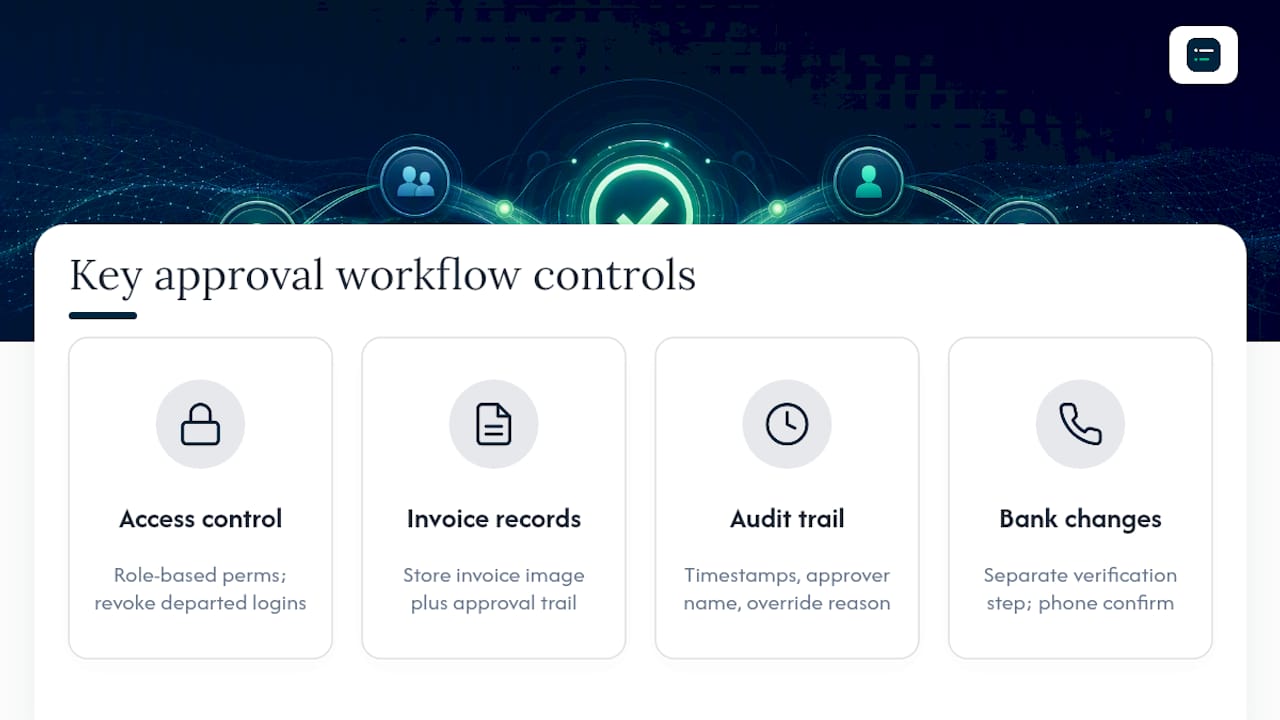
Access control comes first. Every user should have permissions matched to their role: a junior clerk cannot approve their own submitted invoice, and a leaver's login is revoked the day they go. Role-based permissions, checked regularly, close the gap between policy on paper and what people can actually do in the system.
Data retention matters too. Under the Companies Act 2006, private companies must keep accounting records for three years and public companies for six, and HMRC's VAT guidance says VAT records should generally be kept for at least six years. A workflow tool should store the invoice image alongside the approval trail, not just the metadata, so the full record survives an audit years later.
Audit readiness is the practical payoff. When every approval carries a timestamp, an approver name and a reason for any override, producing an audit trail becomes a data export rather than a search through email threads. Segregation of duties is also a control external auditors commonly test: whether the person who raised a purchase order can also approve its invoice.
Finally, treat supplier bank detail changes as a separate approval path with more scrutiny. Business email compromise fraud often targets this step by asking finance to update payment details for an existing supplier. Route bank detail changes through a separate verification step, ideally a phone call to a contact you already hold, and check new details with Confirmation of Payee where your bank offers it.
!Four invoice approval security controls
How are AI and machine learning changing invoice approval?
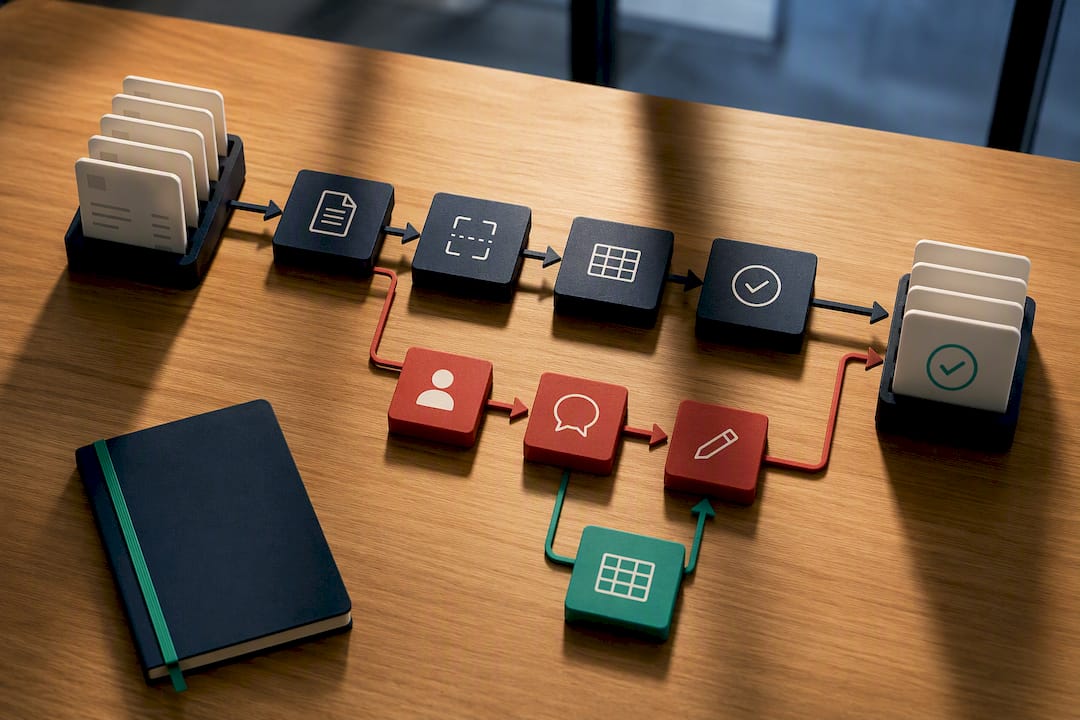
The most immediate AI use in invoice approval is extraction: reading a scanned or PDF invoice and pulling out vendor name, amount, line items and GL coding without anyone retyping it. Current tools go beyond simple optical character recognition and learn a vendor's invoice layout over time, so fewer corrections are needed.
Anomaly detection is the second change. As well as fixed tolerance bands, machine learning models can flag an invoice that looks unusual for that particular vendor even if it falls within a standard tolerance, such as a duplicate with a slightly altered invoice number or amount that a rules engine would miss.
Predictive routing is a third, newer capability: the system learns which approver usually clears a certain invoice type and routes accordingly. It works inside the approval matrix rather than replacing it.
None of this removes the need for human judgement on ambiguous invoices, and AI extraction should not be treated as infallible from day one. AI takes on the repetitive matching and flagging, and approvers spend their attention on the exceptions that need it.
!Automated invoice processing with exception review
Shortlisting invoice approval tools
When you compare invoice approval software against your own approval matrix, an independent directory is quicker than a dozen demo calls. The AI Ledger directory lists 300+ AI tools for accountants and bookkeepers, each with an editor score that is never for sale, a verdict and a last verified date. Use the tool finder to narrow the field by your accounting platform, whether that is NetSuite, Xero or something else, and compare to put two shortlisted tools side by side. For capture tools, see the data entry and receipts category. For approval and payment in one US tool, see our Forwardly review.
Check the last verified date on any listing, and confirm integration depth in the demo rather than relying on a feature list. The free weekly newsletter covers feature and price changes as vendors make them. For more on adoption and notification design, InvoiceLabs' guide to invoice approval workflow is a useful read, and our guide to accounts payable automation covers the wider invoice-to-pay process.
Sources
- Is automation obtainable? it is in your accounts payable department | AIIM
- Invoice Approval Workflows: How to Design Routing That Stops Stuck Invoices | Corpay
- Supplier invoice approval workflow: 2026 design | ininvoice
- Companies Act 2006, section 388 | legislation.gov.uk
- Record keeping for VAT (VAT Notice 700/21) | GOV.UK
Recommended
- Invoice reminder automation: a practical how-to for finance teams
- Accounting workflow automation examples for 2026
- Finance automation workflow types: a guide for finance managers)
- Accounts payable automation: what it is and how it pays off