AML automation for accountants: a practical adoption guide
By The AI Ledger editorial team | Published 2026-08-23 | Updated 2026-11-20
AML automation builds risk-based checks into onboarding and monitoring workflows, reducing manual review and recording auditable evidence at each step. Configurable rules apply the same checks across every client file and service line, instead of depending on which partner opens the file.
The single first move is to pick your highest-manual-burden AML touchpoint, usually client onboarding, and pilot automated ID verification plus sanctions screening on it before rolling out further. The aim is to move from ad hoc checklists to a rule engine, of the kind First AML describes, that works the same way whoever handles the client. That means fewer inconsistencies for a supervisor to query and less re-keying of data that already exists on Companies House.
- Pilot one touchpoint (ID plus sanctions screening) before a full roll-out.
- Judge the result on the audit evidence it produces as well as on speed.
Under the Money Laundering Regulations 2017, firms must apply risk-based customer due diligence and keep records of it. Automation is one way to do both consistently.
Key Takeaways
AML automation works best when a configurable rule engine is tested in a proper pilot, and judged on its audit trail as much as its speed.
| Point | Details |
|---|---|
| Start with one touchpoint | Pilot automated ID verification and sanctions screening on a small client cohort before rolling out further. |
| Prioritise auditability over speed | Choose software whose evidence trail would survive a supervisor's questions, not just the fastest checks. |
| Ask vendors direct questions | Confirm data jurisdictions, exportable audit trails, escalation rules and retention policies before signing. |
| Keep training current | Refresh staff training whenever risk templates change, not only during initial onboarding. |
| Compare options before committing | The AI Ledger's directory and finder help you shortlist tools using editor scores rather than vendor marketing alone. |
Table of Contents
- Why accountants are automating AML checks now
- Core automation features and workflows worth prioritising
- How to evaluate and select AML automation for your practice
- Implementation checklist: from pilot to firm-wide roll-out
- Further reading
- Best practices for training accountants on automated AML systems
- Data privacy and cybersecurity in AML automation
- Future trends in AML automation for accounting practices
- Challenges and limits of AML automation in accounting
- Where the judgement goes
- Comparing AML automation tools
- Frequently asked questions
- Sources
Why accountants are automating AML checks now
Manual AML reviews take up time that is rarely billed. Time a trainee spends chasing a passport scan and checking a sanctions list by hand is time not spent on chargeable work. Automation handles identity checks, screening and document capture without depending on which member of staff happens to be free.
There is a regulatory side too. The regulations require a risk-based approach, and a supervisor reviewing your files will look for it to be applied consistently across offices and partners. First AML argues that building compliance logic into the workflow moves decision points out of partners' inboxes and into rules that are applied automatically.
Cost and timelines vary by firm size. Piloting on a small client cohort before committing to a full licence is a sensible approach, and the timeline depends mostly on the firm's complexity and how much legacy client data needs migrating.
None of this requires ripping out your existing practice management system. Most AML tools are built to sit alongside it, not replace it.
Core automation features and workflows worth prioritising
AML platforms differ in what they do well, so be clear about what you are buying.
- Automated identity verification and sanctions/PEP screening. This is the baseline. FigsFlow is aimed at UK accounting firms and offers ID verification alongside sanctions and PEP checks, paired with secure document capture so evidence never lives in an inbox.
- Risk-based rule engines and service-line templates. A firm-wide rule set means a tax-only client and an audit client get different checks automatically, rather than a single blunt checklist applied to everyone.
- Ownership and entity-structure mapping. For complex or corporate clients, the software should map beneficial ownership automatically rather than asking a trainee to trace a shareholding chain by hand. First AML builds this into its central client record, auto-mapping structures as part of the standard workflow.
- Ongoing monitoring with triggered reviews. Good systems don't stop at onboarding. They flag changes in risk (an adverse media hit, a sanctions list update) and route the alert to the right person automatically.
- Audit trails with timestamps and rationale. Every decision, every screening result, every escalation should be logged automatically, giving you a ready-made answer when a supervisor asks why a client was accepted.
- Integrations that matter. Look for direct links to Companies House, your practice management system and your accounting ledger, so client data does not need re-entering.
Other UK options include IRIS Elements AML and SmartSearch. Platforms lean on different strengths, such as biometric checks, bulk verification or the data sources behind identity checks, so check each vendor's current feature list against your client mix rather than picking on brand recognition.
Before comparing platforms, list the AML queries you have had recently from a supervisor or reviewer. Whatever keeps coming up (missing rationale, unclear escalation, slow document retrieval) shows which feature to prioritise.
How to evaluate and select AML automation for your practice
A poor choice costs you in subscription fees and in the compliance gaps it leaves, so work through a checklist.
Your shortlist criteria should cover:
- Configurability: can rules be tailored to your service lines, or is it one-size-fits-all?
- Verified data sources: where does the screening data actually come from, and how often is it refreshed?
- Integration: does it talk to Companies House, your practice management software and your ledger without manual export/import?
- Auditability: can you pull a timestamped record, with rationale, for any client quickly?
- Pricing model: flat fee, per-seat or per-check, and how does that scale as client numbers grow?
- Support: is there a real UK-based team you can reach when a screening result looks wrong?
Before signing anything, ask the vendor these questions directly:
- Which jurisdictions does your screening data cover, and where is that data hosted?
- Can I export a full audit trail in a format my supervisor or regulator will accept?
- What are the default escalation rules, and can I change them without a support ticket?
- How long is data retained, and what happens to it if we cancel?
Watch for a few red flags: vendors who won't name their underlying data sources, tools with no visible audit log (just a "completed" tick), and pricing structures that charge per check with no volume discount, which gets expensive as you grow. TaxCalc's AML Centre (see the TaxCalc listing) is a useful benchmark, since it bundles risk scoring, SAR logging and Companies House integration into one firm-wide view rather than charging piecemeal for each function.
Pilot on a real but low-risk client cohort and measure two things: time saved per onboarding and whether the audit trail would satisfy an external reviewer without further explanation.
Implementation checklist: from pilot to firm-wide roll-out
Moving from decision to delivery works best as a staged process with clear ownership at each stage, not a single big-bang switch.
- Define scope and appoint an owner. Your MLRO should sign off on the risk framework, while a project owner (often a practice manager) handles day-to-day configuration and staff questions.
- Map existing processes. Document exactly how onboarding and monitoring work today, including every manual handoff, before configuring the new rules around them.
- Confirm integrations and security requirements. Check API access to your practice management system and ledger, and confirm data residency meets your firm's own policies.
- Run the pilot. Choose a small client cohort, run it in parallel with your existing process if you can, and log time saved plus any gaps in evidence completeness.
- Iterate the rules. Adjust risk templates based on what the pilot actually surfaced, not what you assumed in advance.
- Train staff properly. Everyone touching a client file needs to understand what the system flags and why, not just how to click through it.
- Scale with governance checkpoints. Set monthly KPI reviews for the first quarter (time saved, alerts actioned, files with complete audit trails) before expanding to every office.
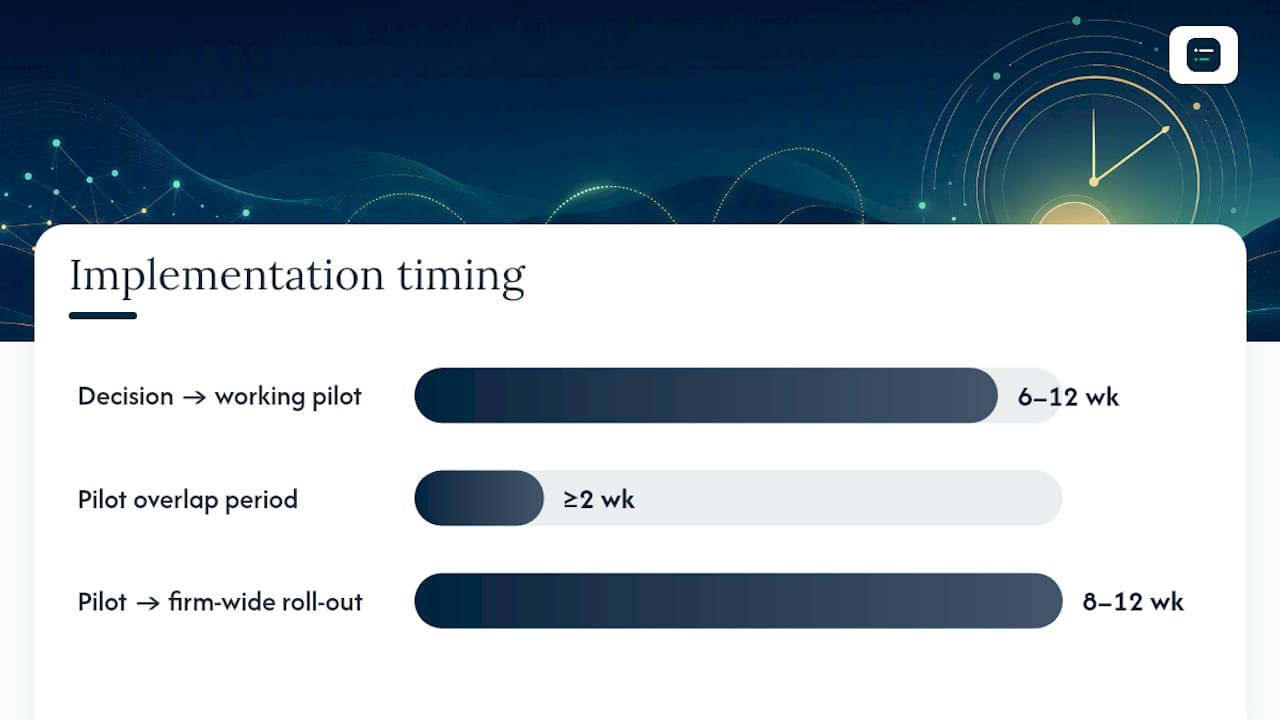
Run the pilot and your existing manual process side by side before switching over fully. The overlap is where you catch configuration errors before they affect a real client file. Allow extra time if you are migrating years of legacy client files.
!Implementation checklist: from pilot to firm-wide roll-out, overview diagram
Further reading
- Accounting workflow automation examples for 2026, useful when designing your own AML pilot workflow.
- How to build accounting workflow templates in 2026), for turning rules into repeatable templates.
- Common accounting workflow bottlenecks: your 2026 fix), which helps identify where AML duplication is costing you time.
Best practices for training accountants on automated AML systems
A common training mistake is treating AML software as something staff learn once, during onboarding week, and never revisit. Rules change, risk templates get updated, and new starters join without ever seeing the original walkthrough.
Build training around real files, not generic demos. Walking a trainee through an actual (anonymised) client onboarding, showing exactly what the system flagged and why, sticks better than a slideshow of features. Pair this with a short reference sheet covering what each alert type means and who owns the escalation.
Refresh training whenever you change a risk template or add a new service line, since a rule that was never explained is a rule staff will quietly work around. Build in a short annual refresher too, timed to coincide with your firm's own risk assessment review, so the training stays current rather than static.
Finally, make sure whoever configures the escalation logic can explain it in plain language to the rest of the team. A system nobody understands gets treated as a black box, and staff either over-trust it (accepting every "pass" without a second look) or under-trust it (manually re-checking everything anyway, which defeats the point of automating).
Data privacy and cybersecurity in AML automation
AML platforms hold some of the most sensitive data a practice touches: passports, proof of address, beneficial ownership details and screening results tied to named individuals. Data privacy is a real operational concern.
Ask any vendor where client data is hosted and stored, and whether that meets your firm's obligations under UK data protection law. Look for encryption both in transit and at rest, clear data retention policies (how long is a rejected applicant's passport scan kept, and why), and a documented process for what happens to your data if you cancel the contract.
!Accountant reviewing data security concept on tablet

Access controls matter as much as encryption. Not every member of staff needs to see every client's full identity documents, and a platform that lets you restrict access by role reduces both accidental exposure and insider risk. Check too whether the vendor supports two-factor authentication as standard, rather than as a paid extra.
Finally, ask about breach notification commitments. If a vendor suffers a data incident, you need to know how quickly they'll tell you, since your own regulatory obligations may require you to notify clients or the Information Commissioner's Office within a set window.
Future trends in AML automation for accounting practices
Two features worth asking about are multi-bureau identity checks, where a platform cross-references several independent data sources rather than one, and biometric verification for clients who complete onboarding on a phone.
Expect risk engines to grow more granular, moving beyond a single "low/medium/high" score toward templates that weight specific risk factors (jurisdiction, industry sector, ownership complexity) differently for each service line a firm offers. That could reduce the borderline cases that need a human decision, leaving MLROs to focus on the ambiguous ones.
Integration depth is likely to keep improving too, with tighter links between AML platforms, Companies House data and practice management systems reducing double entry, with audit trails built up as part of the workflow rather than as a separate task afterwards.
Challenges and limits of AML automation in accounting
Automation has limits. The most obvious is over-reliance: staff start treating a "pass" from the system as the end of the conversation, when an unusual client structure still needs a human to ask an extra question.
Configuration takes work too. A rule engine is only as good as the risk templates behind it, and building those properly takes time upfront. Get the templates wrong and you either flag too much (alert fatigue) or too little (a genuine risk slipping through unchallenged).
Legacy client files are another sticking point. Migrating years of existing client due diligence into a new system can be slow, and you may need to run two processes in parallel for longer than planned.
Pricing structures can also work against firms as they grow. A per-check model that looks reasonable for your current client list can become expensive as it grows, so model costs at your projected client volume before committing.
Where the judgement goes
Automation does not remove judgement from AML; it moves it earlier, into the design of the risk templates. A poorly configured rule engine can be worse than a careful manual process, because it looks consistent while missing the cases that matter. So treat the pilot as a real test: measure time saved, and check whether a supervisor would accept the audit trail without further questions.
Comparing AML automation tools
The AI Ledger is a directory of 300+ AI tools for accountants and bookkeepers, each with an editor score, a verdict and a last verified date; scores are never for sale. Use the finder to match tools to your practice size and the task you are automating, browse the directory, or put two tools side by side with compare.
Frequently asked questions
What is AML automation for accountants? It's software that embeds risk-based identity checks, sanctions and PEP screening, and ongoing monitoring directly into a firm's onboarding and review workflows, replacing manual checklists with rules that apply consistently and log every decision automatically.
How long does it take to implement AML software in a practice? It depends on the firm's size, the number of service lines and how many legacy client files need migrating. Plan a pilot on a small cohort, run it alongside your manual process, and set the firm-wide timetable from what the pilot shows.
Does AML automation replace the need for an MLRO? No. It changes what an MLRO spends time on, shifting effort away from manual checklist chasing and toward designing risk templates and reviewing the genuinely ambiguous cases the system flags.
Which AML software integrates with Companies House? Several platforms built for UK accounting firms, including TaxCalc's AML Centre, offer direct Companies House integration to pull company data automatically rather than requiring manual entry.
Is AML automation only worth it for larger firms? No. Small practices have the same due diligence obligations and less spare capacity for manual AML admin, so consistent, logged checks can help them as much as larger firms.
Sources
- AML Software for Accounting | First AML
- AML Software for Accounting, FigsFlow
- The Money Laundering, Terrorist Financing and Transfer of Funds (Information on the Payer) Regulations 2017
Recommended
- Data entry automation tools: a practical guide for accountants
- Why accountants adopt AI tools: a 2026 guide)
- Accounting workflow automation examples for 2026
- Grow your bookkeeping practice with automation)